WILL Website Obscura
How to do some of the unique things
WILL dismissible alerts
The website has the capability to display dismissible alerts such as when transmitter maintenance will take the station off the air, or a special fundraising message, etc.
Several of these alerts currently exist in the CMS, but the display of these alerts are usually disabled by commenting out their code. To enable display, remove the "comment out" elements.
Here's an example alert on the WILL Home page:
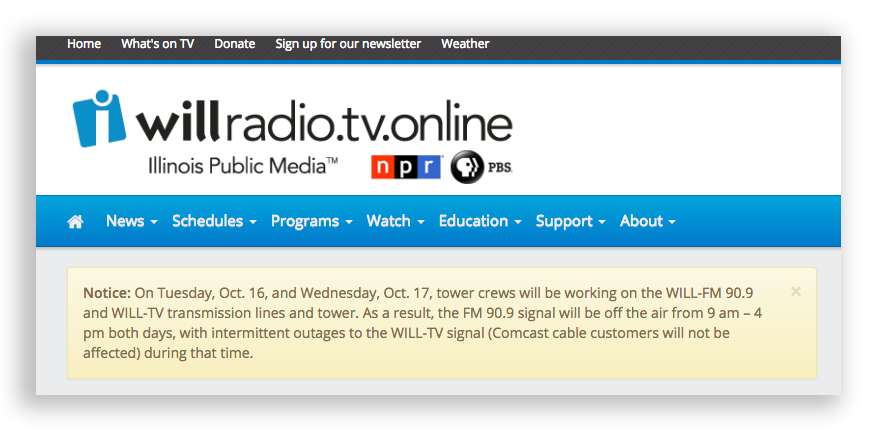
To create or update these alerts, two things must be done./p>
First, write or update the copy that will be displayed. This is done in Add-ons -> Modules -> Low Variables -> Editable content. This is also where we disable display of the alert by commenting out the code, or enabling display by removing the html "comment out" elements.
Here's a sample of the code for an "Off the Air" alert:
<div class="alert alert-warning alert-dismissible" role="alert">

  <button type="button" class="close" data-dismiss="alert" aria-label="Close"><span aria-hidden="true">×</span></button>

  <strong>Notice:</strong>
On Wednesday evening July 15, WILL is performing maintenance at

our Monticello transmitter site. From the hours of 7 pm Wednesday to 6 am Thursday morning, our FM

90.9 broadcast will be off the air while tower climbers replace parts of our TV transmission

line. During the outage of FM 90.9, our FM program service will continue from our 101.1 translator

in Urbana and online at our website. We apologize for the inconvenience during this necessary

maintenance work.
</div>
Second you need to tell ExpressionEngine where to display the alert. To add the alert, go to Template Manager -> Snippets. To add to the main home page, go to the sn_homepage. To add the alert to other home pages, you need to do similar things to sn_homepage_agriculture, sn_homepage_education, sn_homepage_fm, etc.
The lv_alert_pledge and lv_alert_problem snippets are already added to the main home page, placed just above the slideshow at the top. That's probably the best place for these and other alerts, but stacking them would be visually problematic.
To add the Low Variable to the page, paste the Low Variable into the snippet
In this case we're adding the Pledge Alert:
{exp:low_variables:single var="lv_alert_pledge"}
Replace "lv_alert_pledge" with the name of whatever alert you need to display.
Remember to comment out the lv_(whatever_alert) snippet when the need for it is done and you don't want the alert to display!
Tag-based Special Project Pages
Sometimes we need a page for displaying content tagged with a specific keyword/tag. This is different from the unique pages created automatically for each tag in the CMS. This section will explain why we sometimes need something different, and how to create a special tag-based collection.
What's Different about a Tag-based Content Collection
Let's say we have special project about the Supplemental Nutrition Assistance Program (SNAP). We're going to produce News stories, do interviews on The 21st, and produce some video segments and whatever else. We want a special project page for the SNAP series and in addition to the content, that page should have its own SNAP series branding and description.
Let's say for example like this SNAP Series page.
This is different from a regular tag page in several ways:
- The regular tag page for the tag "snap-series" displays the same content but doesn't have a unique brand and description, and there's no way to add these without changing the way all regular tag pages work. We want the SNAP series page to look like a special project.
- Regular tag pages behave differently in other ways. For example, the tag page for "snap" displays all posts tagged snap, and that's more than we want in our special series. Regular tag pages only display the post titles, and include content from all channels. We may not want that for our special series.
- We also have some regular tag pages designed to display tag-based content only from specific channels. For example the template
tags/newsdisplays only News channel content based on its tag, like https://will.illinois.edu/tags/news/affordable-care-act/. In this case "affordable-care-act" in the 3rd url segment is the url-safe representation of the tag "Affordable Care Act". And the templatetags/newsis set to only display News content with that or any other tag.
But with a special project we need more than a regular tag page. The project page needs a description at the top, and it can display posts from any channels you specify when setting it up. Here's how to do that.
Setting up a Tag-based Special Project Page
Here are the ingredients:
- A description for the project as an entry in the Channel Descriptions channel. Should contain some kind of branding image along with a short about of text.
- A new template for the project. It doesn't matter which Template Group the template is in, especially if we're going to include content from more than one channel.
- A tag to use for the project. Very likely this is a tag created for just the project, so as to limit the number of entries the page will display to just those you really want to display. For example with the SNAP Series project the tag was "snap-series" and not "snap", because the latter pulls in a ton of entries we didn't want to display on the project page.
The Template
You can copy the page template from another tag-based project (like news/snapseries), but here's the basic idea:
Do this:
- Include the correct Channel Description id for the project, and make sure to use url-safe tags in the pre-tags variable. Probably use only one tag, to limit entries to just those wanted for the series.
- Include the specific channels from which content will display on the project page.
- Edit the text for the other variables as needed. The pre_title and pre_description variables are used for metadata in the pages head section, and nowhere else.
- Include the appropriate sidebar.
- OK and very important: Make sure whoever is posting content for the project knows what tag to use.
- The snippet
{sn_articles_by_tag}does the rest.
URL Redirects
We can create an arbitrary custom url, using the site domain of will.illinois.edu, and redirect it to any other url.
Example use case
Let's say we need a human-readable link to an Allegiance pledge form. So we want a url of e.g. https://will.illinois.edu/ThinkAgain and have it redirect to the Allegiance form (which has a long and complicated url).
What to do? Create a url redirect!
How to create a url redirect
- Create a new entry in the WILL Pages channel.
- Enter the starting url in the Pages URI field, e.g.
/ThinkAgain. As always with the Pages URL, the site domain is included automatically before the first backslash. - In the Template dropdown select
pages/redirect - In the Links to other Web Pages field, enter the destination url for the redirect, e.g. that long and complicated Allegiance web form.
- Save the entry and boom, the redirect will start working.
How the pages/redirect template works
The pages/redirect template consists of one simple code block:
Since the template doesn't need to render any html, it doesn't need any markup. Just the meta tag that redirects to the link_url in the entry.
WILL Podcasts
We can display podcasts as html on the site. The 21st, Environmental Almanac, and Legal Issues in the News are examples.
First you have to write and update the copy that will be displayed. This is done in Add-ons -> Modules -> Low Variables -> Editable content in the lv_alert_problem local variable.
Embed code:
<div class="pb-embed" data-feed="http://will.illinois.edu/21stshow/rss" data-limit="XXXX"> </div>
		<script src="https://will.illinois.edu/WILLPodcastEmbed.js"></script>
Replace the RSS URL with the URL of the podcast you want to embed on another site. Replace XXXX with the number of items from the feed that you want to display.