WILL Website Manual for Content Authors
Introduction to the site and our Content Management System
Website Introduction & Structure
The WILL website is built for clarity. It uses design patterns or predictable blocks of content that appear consistently throughout the site. This makes it easier for users to find what they’re looking for. It should make your life easier as author, giving you freedom to create content without worrying about putting it in the right place at the right time. You should have creative freedom, and our users should have a great experience. Our promise is a great website for all concerned. But creative freedom requires attention to a few requirements.
This document is a guide to the freedoms and requirements for content creators on the WILL website. If you encounter anything not covered in this guide, please contact the Webmaster.
Site structure
A website should make sense to users. This rests on being well-structured and mostly predictable. Using a Content Management System (CMS) makes structuring websites much easier. A CMS-based site uses two essential components to build that structure:
- a database which stores content to be displayed
- webpage templates which contain rules about how to display the content
Navigation ties everything together, and if done well makes it easy for users to find what they're looking for.
Entries and List Views
An Entry is any discreet chunk of content. Examples: a News story, a Focus program, a promotional announcement, or a Mid-American Gardener video archive. You create new Entries in our CMS, one at a time, by filling out a new Entry form.
A List View is a collection of Entries displayed on a single web page.
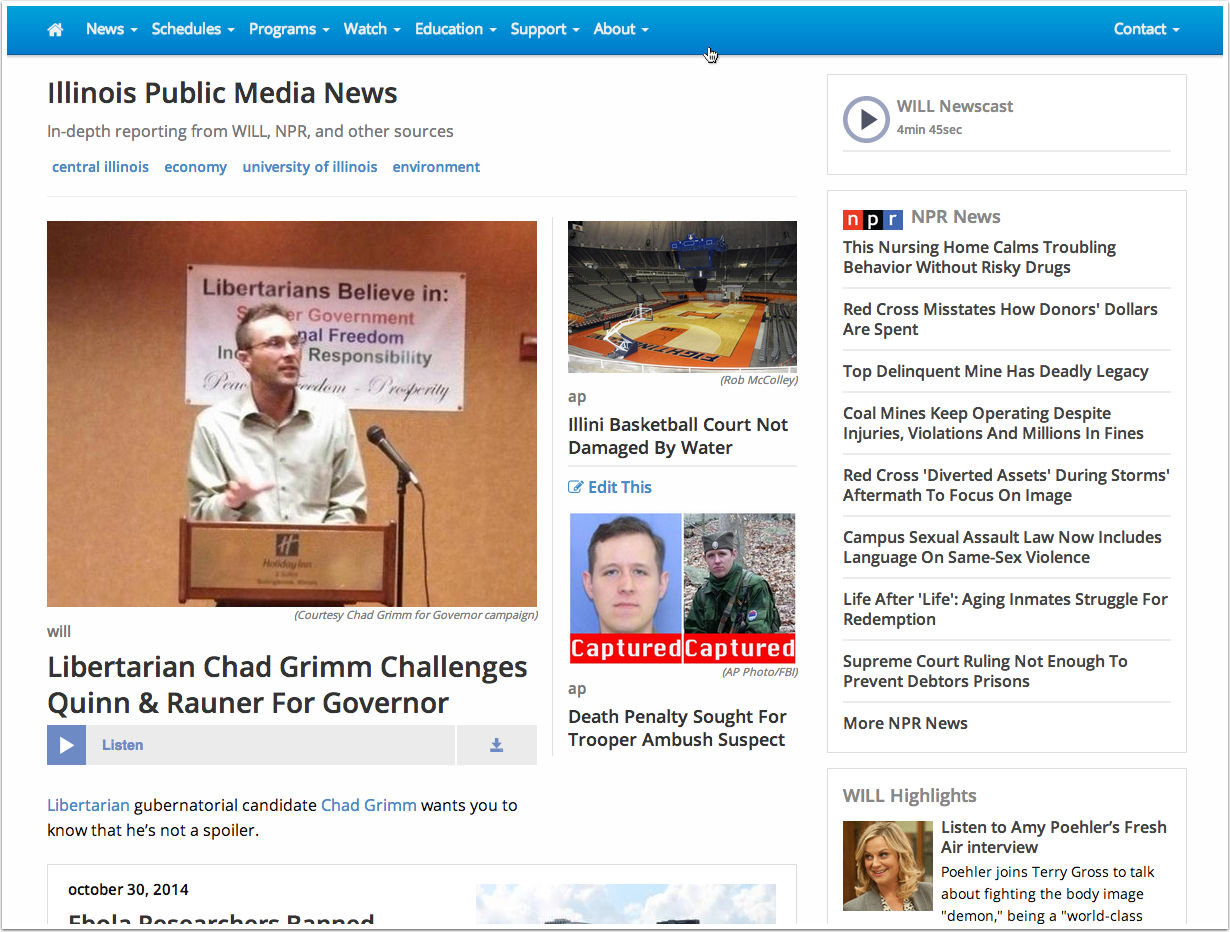
For example the News page on our site is a List View of news Entries, displayed by date with the most recent at the top of the page. Each page has 10 news stories, with pagination links at the bottom of the page leading to many more List View pages. On each List View page, each of the ten stories is presented as a headline, thumbnail image, and short text summary with a “Continue Reading” link. Clicking this link leads to the full news story as a full Entry.
Here's a List View, the home page of our News Section:
Entry pages contain a single item
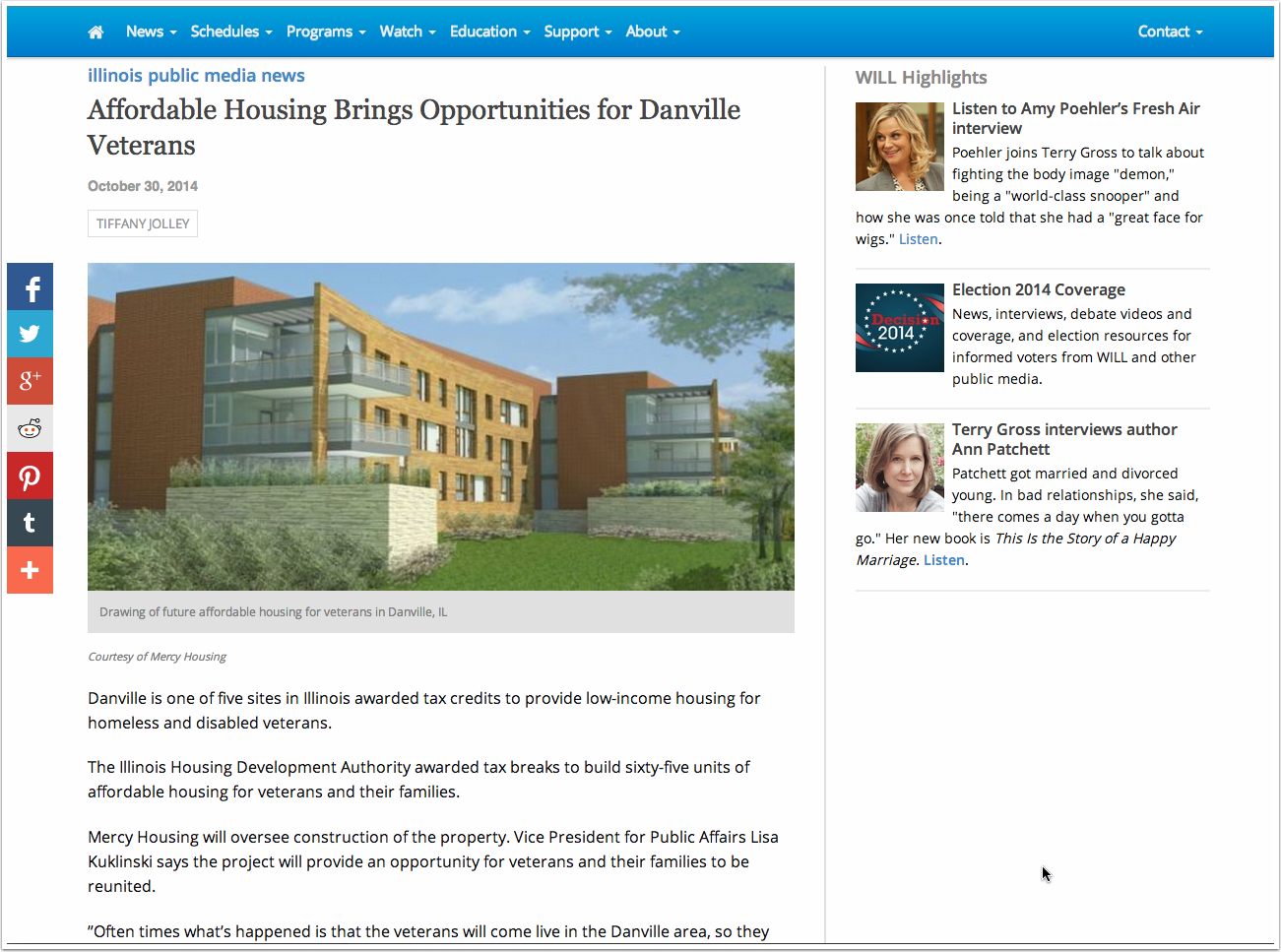
Entry pages contain the full entry including everything. An Entry page can display anything our website currently supports: text, images, audio, video, documents for download, and other types of content.
Here's an Entry page for a story in the News Section:
So you have List View pages, and full Entry pages.
This same pattern is used for every major section of the site. As a content author, your task is to do the best possible job of creating a great Entry. The website CMS does the rest, including creating the List Views automatically.
This is like a Blog, where new entries are added at the top of the page, pushing previous entries down. Almost everything on the IPM site behaves like a Blog, with the exception of these things called Pages.
Pages
Pages are different from anything else on the site. The section called WILL Pages will create singular stand-alone web pages. A Page is often used for static content, like the About WILL page.
There are a few important differences with Pages:
- A Page is always a single Entry, and is never a List View: One Entry per Page.
- A Page can be assigned any URL, and that’s done in the Entry form in a field labeled “Pages URI”. The Page URI should always start with a forward-slash (/), which stands for our site root (http://will.illinois.edu). The rest of the URI is up to you, but it should be short and reflect the purpose of the page. For example for the About WILL page, the Page URI is /about. This makes full URL for the users: http://will.illinois.edu/about
- Never use spaces or special characters in a URI as they will break the link. Allowed are only Alphanumeric characters, underscores (_) and dashes (-).
- So you can give a Page a custom URL. But you can also assign it to a specific web page template and there are a number of different designs you can choose. We’ll probably add even more designs as the need arises.
- Only some content authors have access to create and edit Pages. For the above reasons they are a bit more complicated, and we don’t want too many of them created without planning.
Home pages
Home pages ties everything else together, providing a starting point for users to find List Views, Entries, and Pages in every section of the site. Home pages comprise:
- The main site Home page: http://will.illinois.edu
- The TV, AM, FM, Support, and Education home pages.
Home pages are fairly complex. They pull in content from many different sections as either List Views or Entries. For example when a new News story is created, it automatically appears on both the News page, and the site Home page (and the top navigation, just to make it easy to find). Home pages contain lots of programmy logic, and for that reason they have to be coded and maintained by hand. So any structural changes to Home pages need to be done by the Webmaster.
Site Outline
  WILL Home page
  ├── News Home page (list view)
  │   ├── Story 1 (entry view)
  │   ├── Story 2 (entry view)
  │   ├── Story...(entry view)
  ├── Focus Home page (list view)
  │   ├── Program 1 (entry view)
  │   ├── Program 2 (entry view)
  │   ├── Program...(entry view)
  ├── Classic Mornings Home page (list view)
  │   ├── Program 1 (entry view)
  │   ├── Program 2 (entry view)
  │   ├── Program...(entry view)
  ├── Other Sections... (list view)
  │   ├── ...(entry view)
  └── About WILL (Page)
  └── Contact Us (Page)
  └── (many other Pages)
Home page Slideshow and Highlights
Each Home page contains two blocks for promoting things we want people to see:
- WILL Highlights (Slideshow)
- WILL Highlights (Sidebar)

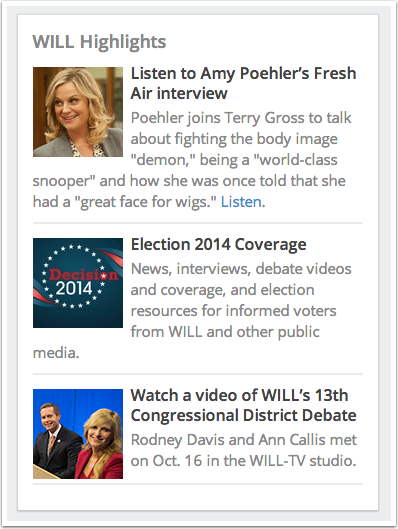
WILL Highlights: Placement in either the slideshow or the sidebar
When you create a new entry in WILL Highlights, you can select where to display it: in the Slideshow or Sidebar on any of the home pages. You make this selection by checking one or more of the Categories in the WILL Highlights entry form:
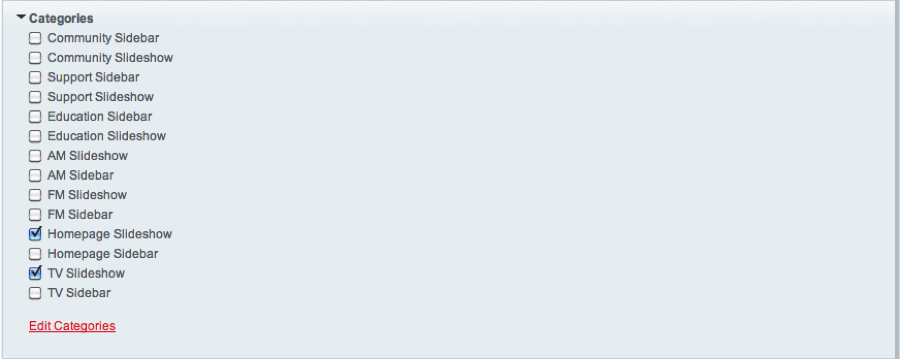
The Slideshow box on each home page can display up to eight entries which cycle through repeatedly. The Sidebar highlights are limited to three entries. If more than three Sidebar highlights are slotted for any given home page, only the most recent three will display. (Unless you make them Sticky, which keeps them at the top of any display regardless of when they were entered.)
Note that the entry form for WILL Highlights contains two different image fields: Image and Square Thumbnail Image.
- If you want this entry in the Slideshow, use the Image field, and upload an image cropped to 800px by 600px. Any other size will cause a misalignment between the Slideshow and other page elements.
- If you want to put this entry in the Sidebar, use the Square Thumbnail Image field. Make sure the image you upload is cropped to a square aspect ratio, otherwise the CMS will crop it for you to display at 90 by 90px.
Only a few staff members have access to create and edit WILL Highlights and WILL Sidebar entries; this space is managed by Marketing, and is used to give visibility to IPM’s promotional priorities. If you want something promoted in this space, you should contact Marketing.
About Entry forms and Fields
An Entry form contains a collection of fields, like Title, Description, Audio, Image, etc. There are several different field types, for example text, date, file upload, and several more exotic ones. It is critically important to use the fields the way they are intended. For example, don’t use the Title field to enter a date, or a Link field to link to an MP3 file. Instructions for each field are included in the Entry form. Contact the webmaster for any clarification or questions.
It’s important to understand that the Entry forms for all sections of our CMS use the same fields. But the Entry form for one section may look different from the Entry form in another section. They may look different but they aren’t: fields can be hidden if they aren’t needed for a particular section. For example we have a section called Document Uploads, where the only visible fields are Title, Date, and Documents. We could un-hide the Video field for Document Uploads, but in reality you would never attach a video to a Document. Hiding extraneous fields makes the Entry forms easier to use.
Why do we have the same fields for every section of the site? The answer is two-fold, and will help you understand how the site is constructed:
- Each field is a slot in the database. When you enter a Title into an Entry form, the text you put there is saved in a specific place in the database. Same with Images, Descriptions, Keywords, Audio, Video, etc. By having one set of fields for all sections, we keep the database well-structured and efficient. This makes for much faster web pages, and better design.
- Since every section of the site uses the same database fields, we can reuse the same webpage template code throughout the entire site. Instead of building custom web pages for each section, we can use the same basic code for (e.g.) News as we do for Focus. The only difference is, we pass a variable with a value of “news” or “focus” to the webpage template, causing it to draw News or Focus content from the database. There are only a very few actual webpage templates used to build about 30,000 pages on our website. This makes it easy to change things throughout the site. And because of the way browsers cache things that can be reused, it makes our pages lightening fast.
Here is a complete list of all the content fields that are (potentially) available in all sections:
- Entry Date (required)
- Title (required)
- Audio File
- Byline
- Description
- Documents
- Images
- Links to other Web Pages
- Owner
- People
- Related Entries
- Short Title
- Square Thumbnail Image
- Teaser
- Text Transcripts
- Video Embed
We explain how to use these fields in the section How to Publish Web Content.
But wait there's more!
The Options tab of the Entry form contains a few more fields that are important for metadata. Metadata enables our content to be better indexed and reused by search engines and social media.
We cover Metadata with awesome detail in the Metadata section.
Open and Closed Entries
You can “close” any entry without deleting it. This might be useful if you have an entry you will reuse, or simply archive.
In some cases, pages are set to display Closed Entries as an archival record, while the home pages are set to show only Open Entries to avoid clutter. We want to preserve all content and metadata, so instead of deleting entries it’s better to Close them or set an Expiration Date. (Exceptions would be duplicate entries or content that really should never been seen again. Or maybe ever seen in the first place. But we don't want that.)
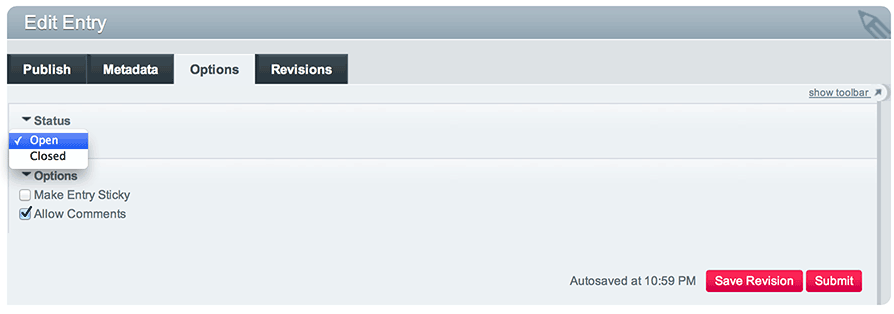
To close an entry, in the entry form click the Options tab and use the Status dropdown to select Closed. That’s it!
Questions?
Confusingness above, or website things not covered? Please contact the Webmaster.